N8Technologyhub

Friday, 13 May 2016

Hacking Website with Sqlmap in Kali Linux

Hacking Website with Sqlmap in Kali Linux


Kali Linux

First off, you need to have Kali linux (or backtrack) up and running on your machine. Any other Linux distro might work, but you'll need to install Sqlmap on your own. 


Sqlmap


A screenshot from the SQLmap official website

Basically its just a tool to make Sql Injection easier. Their official website  introduces the tool as -"sqlmap is an open source penetration testing tool that automates the process of detecting and exploiting SQL injection flaws and taking over of database servers. It comes with a powerful detection engine, many niche features for the ultimate penetration tester and a broad range of switches lasting from database fingerprinting, over data fetching from the database, to accessing the underlying file system and executing commands on the operating system via out-of-band connections."
A lot of features can be found on the SqlMap website, the most important being - "Full support for MySQL, Oracle, PostgreSQL, Microsoft SQL Server, Microsoft Access, IBM DB2, SQLite, Firebird, Sybase and SAP MaxDB database management systems." That's basically all the database management systems. Most of the time you'll never come across anything other than MySql. 

Hacking Websites Using Sqlmap in Kali linux

Sql Version

Boot into your Kali linux machine. Start a terminal, and type -
sqlmap -h
It lists the basic commands that are supported by SqlMap. To start with, we'll execute a simple command
sqlmap -u . In our case, it will be-

sqlmap -u http://testphp.vulnweb.com/listproducts.php?cat=1
Sometimes, using the --time-sec helps to speed up the process, especially when the server responses are slow.
sqlmap -u http://testphp.vulnweb.com/listproducts.php?cat=1 --time-sec 15
Either ways, when sqlmap is done, it will tell you the Mysql version and some other useful information about the database.

The final result of the above command should be something like this.

Note: Depending on a lot of factors, sqlmap my sometimes ask you questions which have to be answered in yes/no. Typing y means yes and n means no. Here are a few typical questions you might come across-
  • Some message saying that the database is probably Mysql, so should sqlmap skip all other tests and conduct mysql tests only. Your answer should be yes (y).
  • Some message asking you whether or not to use the payloads for specific versions of Mysql. The answer depends on the situation. If you are unsure, then its usually better to say yes.

Enumeration

Database

In this step, we will obtain database name, column names and other useful data from the database.
                                            List of  a few common enumeration commands

So first we will get the names of available databases. For this we will add --dbs to our previous command. The final result will look like -
sqlmap -u http://testphp.vulnweb.com/listproducts.php?cat=1 --dbs
        

 So the two databases are acuart and information schema.

Table

Now we are obviously interested in acuart database. Information schema can be thought of as a default table which is present on all your targets, and contains information about structure of databases, tables, etc., but not the kind of information we are looking for. It can, however, be useful on a number of occasions. So, now we will specify the database of interest using -D and tell sqlmap to enlist the tables using --tables command. The final sqlmap command will be-
sqlmap -u http://testphp.vulnweb.com/listproducts.php?cat=1 -D acuart --tables

The result should be something like this -
Database: acuart
[8 tables]


+-----------+

| artists   |
| carts     |
| categ     |
| featured  |
| guestbook |
| pictures  |
| products  |
| users     |
+-----------+


Now we have a list of tables. Following the same pattern, we will now get a list of columns.


Columns

Now we will specify the database using -D, the table using -T, and then request the columns using --columns. I hope you guys are starting to get the pattern by now. The most appealing table here is users. It might contain the username and passwords of registered users on the website (hackers always look for sensitive data).
The final command must be something like-
sqlmap -u http://testphp.vulnweb.com/listproducts.php?cat=1 -D acuart -T users --columns


The result would resemble this-


Data

Now, if you were following along attentively, now we will be getting data from one of the columns. While that hypothesis is not completely wrong, its time we go one step ahead. Now we will be getting data from multiple columns. As usual, we will specify the database with -D, table with -T, and column with -C. We will get all data from specified columns using --dump. We will enter multiple columns and separate them with commas. The final command will look like this.
sqlmap -u http://testphp.vulnweb.com/listproducts.php?cat=1 -D acuart -T users -C email,name,pass --dump


 Here's the result


John Smith, of course. And the password is test. Email is email@email.com?? Okay, nothing great, but in the real world web pentesting, you can come across more sensitive data. Under such circumstances, the right thing to do is mail the admin of the website and tell him to fix the vulnerability ASAP. Don't get tempted to join the dark side. You don't look pretty behind the bars. That's it for this tutorial. Try to look at other columns and tables and see what you can dig up.

Friday, 6 May 2016

WiFi Hacking on Android Device

hacking wifi www.wizblogger.com

HACK WIFI AND CRACK WIFI PASSWORD FROM ANDROID EASILY

Everyone wants to Hack wifi from his mobile android devices.since everyone doesnt own a PC to crack the wifi password with kali linux.So In this tutorial you are going to learn how to hack any wifi from your mobile
So i am writing this article to teach you how to hack wifi easily from you mobile device.We are going to learn 2 different tricks to hack wifi password
Dont like Reading?Watch Video here

What you need to hack wifi password 

  • An Android Device
  • The Android phone must be Rooted
  • Good Wifi Signal ( you must be close to the wifi router to hack it FAST)
There are many fake application available on google play, We advice you to stay away from them as they are just FAKE and to waste your time  

Methods to Hack Wifi

  1. Using Wps Connect
  2. Using WIFI WPS WPA TESTER

1.WPS CONNECT

Most of you might have already encountered this application through playstore and thought that this is just another fake application to waste our time.But what if u tell you that this is a real and working application to hack wps enabled wifi?

To Start Hacking WIFI Follow The Steps Below

1. Install WPS Connect on your device
2.Open it and click on scan button
wifi hack android
3.This will show you all the available wifi networks in the nearby area
4.Now select the network which you want to hack
5.This will open a popup which will have pins. Just click on any pin and it will try that pin to hack password
wifi hack android 2
6.If it fails then try clicking on another pin and test again
7.If it fails again then read the bottom of this post
wifi hack android 3

 2.WPS WPA TESTER

Wps Wpa Tester is another application to crack wps enabled wifi networks.It is similar to wps connect but not that advance.

To start hacking follow the steps below

1.First you need to download wps wpa tester
2.Open it and click on scan networks.It will scan available wifi networks in your range.
You can only hack wifi networds which has green colored lock
wifi hack android 6
3.Now click the wifi network you want to hack (it’s lock should be green in color)
4.A popup will open showing list of pins available to crack the wifi.Just click on any pin and press “Try to Connect (root)” button
wifi hack android 7
5.Wait for few seconds while it try to connect
6.Congratulations you have successfully hacked a wifi network from your mobile.Enjoy your free Internet
wifi hack android 8

 
Top Reasons it will fail

  1. You are far away from the Router (Try reducing the distance to -60 and then try again)
  2. There is Mac filter installed on the router (so just forget about hacking this router from mobile and move on)
  3. The pin is incorrect (Try another pin)

 
TIP

If every thing above fails then just go to menu and click on automatic and wait 20-30 mins .It will automatically hack the wifi and auto connect to it else it will show you password in show password

 wifi hack android 5


Wednesday, 20 April 2016

Free net trick....

#Airtel 3G Unlimited Trick [PC]
1. First download config file from here - http://tinyurl.com/j3t25jw
2. Copy all file in C:\program files\NMDVPN\Config
3. Run NMDVPN as administration
4. Connect with US Airtel 3G config file
5. Wait for connect
6. Enjoy Airtel 3G @ 500kbps
Note : NMDVPN is already in config file folder
This trick only for PC .
##############################

[20/04 10:36 pm] We Are Anonymous....😈: Steps:-

› Create New Settings:-
Apn - airtelgprs.com
Proxy - 141.0.9.0
Port - 80
› Now Save This Settings

› Now Open Opera Handler And
Put Frontquery:-
180.179.204.103/cgi-bin/nph-proxy/00A00/ftp://
^^^^^^^^^^^^^^^^^^^^^^^^^^^^^^^^^^^^^^^^^^^^^^^^^^^^^^^^^
* Trick 2:-
› Create New Settings:-
Apn - airtelgprs.com
Proxy - 82.145.210.160
Port - 80
› Now Save This Settings
› Now Open Opera Handler And
Put Frontquery:-
125.21.246.116/cgi-bin/00/http/

Limit- 250mb per Day
[20/04 10:36 pm]
This trick only for phone mobile
We Are Anonymous....😈:

Tuesday, 12 April 2016

WhataApp end-to-end encryption

WhatsApp’s end-to-end encryption isnt as private as you might think

Just a few days ago, WhatsApp trumpeted the roll out of end-to-end encryption for its messaging service. The world rejoiced.

With events such as the battle between Apple and the FBI turning attention to encryption, the announcement was well-timed to ride the crest of the wave. But it seems that for all of the bluster and bravado, the news about extra protection may not be quite as good as it seems.

Analysis of WhatsApp’s privacy documentation reveals that the Facebook-owned company retains a huge amount of data about messages that are sent. If this all sounds familiar, it’s because the retention of metadata is precisely what the NSA was (is?) up to, trawling web communications and upsetting Edward Snowden and privacy advocates around the world. WhatsApp’s encryption and policies mean that those who are concerned about their privacy should not rest on their laurels.

The end-to-end encryption now employed by WhatsApp may mean that it – and third parties – do not have access to the contents of messages that are sent, but it does still know a great deal of potentially privacy-invading information about communication. Included in the data that WhatsApp ‘may retain’ (which, it’s fair to assume, can be read as ‘does retain’) is information about who has communicated with whom, when this communication took place and the intriguingly worded ‘any other information which WhatsApp is legally compelled to collect’.

The privacy section of WhatsApp’s Terms of Service says:

“WhatsApp may retain date and time stamp information associated with successfully delivered messages and the mobile phone numbers involved in the messages, as well as any other information which WhatsApp is legally compelled to collect. Files that are sent through the WhatsApp Service will reside on our servers after delivery for a short period of time, but are deleted and stripped of any identifiable information within a short period of time in accordance with our general retention policies.”

The Apple vs FBI case-that-never-was has highlighted the fact that even when encryption is in place, it is certainly no guarantee that data cannot be accessed by law enforcement agencies. WhatsApp’s connection with Facebook – a social network that gathers huge amounts of information about its users not only in the interests of personalisation, but also for ad-tailoring – coupled with the privacy policy will do little to quell the fears of those concerned about snooping into their correspondence.

End-to-end encryption is a step in the right direction, but it is far from being the end of the story when it comes to privacy

Sunday, 3 April 2016


How to get approved by Google Adsense within 2 hours?

Gone are those days when you apply for Adsense account and get approved without much stress but now, Google Adsense has grown a lot bigger ...
 SEE Unprotected CCTV Live Cameras on Google
 How to Use Keyboard as Mouse in Windows
 How to get google adsense account for free without a website or blog
Gone are those days when you apply for Adsense account and get approved without much stress but now, Google Adsense has grown a lot bigger over the years with millions of active publishers and because of this, their policies have become very strict giving a hard time to those who want to get their account approved. Also, it has become very common to see older accounts getting suspended due to flimsy excuses. To get an approved Adsense account, you might have many times, maybe you've never tried at all, maybe you’re worried if you’ll ever got approved… put all that negative brain waves aside, this post will get you an approved Adsense account within 2 hours if  properly followed and implemented.


I know you have been waiting for this, so I won’t waste any sec of your precious time trying to bore you with reasons why you need an Adsense account or why your request was not approved, just let get this started right away.
  • Create a New Gmail account (tip: Choose United State as your location, some countries like Nigeria are not allowed to monetize Youtube videos).
  • Login to youtube with your newly created Google account
  • Click on youtube.com/account_monetization
  • Enable your Youtube account for monetization
  • You should receive a message in your inbox saying your youtube account is ready for monetization
  • After the message upload a unique video to Youtube
  • Be sure to add right descriptions and related tags to your video
  • Wait for the upload to complete and hit publish

  • Now that your video is monetized, what about Adsense Account?
  • Now go to Channel Settings>Monetization
  • Now you should see your account status.
  • Click on “How will I be paid”?
  • Now click on “associate an Adsense account”


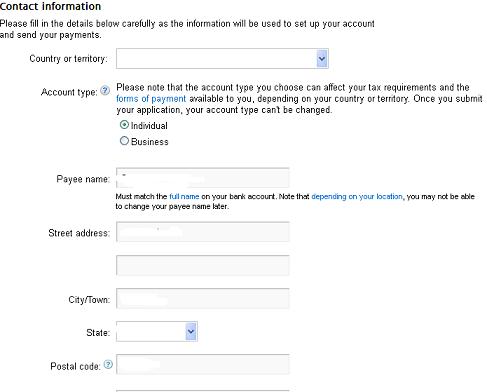
  • Then you will be taking to where you will setup your Adsense account. The screenshot of the same is shown below:

  • Make sure to fill the form accordingly, payee name and address is most important.

  • Click submit and wait for your approval within 2 hours
  • Okay, waiting……1hour…2hours….Now check your mail
  • Wow! You’ve got an approved adsense account!
  • Okay, the next step is to show ads on your blog/site
  • If you’re using blogspot domain, (hosted account) this is very simple to do
  • Login to your Adsense account and click on account settings
  • Scroll down to the bottom to locate invite, enter the email of your blogger account and click on invite
Check your inbox to verify the invitation, after successfully verification you can now login to your approved adsense with your blogspot email address and password

  • Now login to your Blogger account (where you want to show ads) click on earning tab
  • Click on switch Adsense account
  • Login to your Adsense account to associate your approved Adsense account with your blog

You should receive another congratulations message that Adsense gadget has been added to your blog. Click on Layout, you should be able to locate the Adsense gadget. If you don’t see it, do not panic, check your setting tab to make sure you’ve enabled ads to be showing on your sidebar or body content. After verification you should be able to see blank ads space on your blog, within 30 minutes  real ads show be live on your blog.
If you’re using custom domain, I must tell you that Google has changed its policy for approving accounts via host partnered sites (custom domain), which require you to fill out a form and get approval from Adsense team before the ads begin to show on your non-hosted sites. Remember I said earlier that if you’re using hosted site (like .blogspot) you don’t need all this. To fill this form:
  • Login in to your AdSense account.
  • On the Home tab, click  the Account settings page.
  • In the “Access and authorization” section, next to “Only host sites are allowed to show ads for your account,” click edit.
  • On the “Show ads on other websites” page that appears, enter the URL of the site where you plan to show ads.
  • Click Submit.
  • Finally you need to implement AdSense ad code on the URL that you provided above, on a page that receives traffic.

Once your request is approved, you can place your ad code on any website that you own without any further approvals. If your application is not approved, you should receive a message in your adsense account stating reason why your site is not approved, meanwhile you still got your approved adsense account and you can correct the errors and resubmit again.

You can see that blogspots domain (hosted account) got their ads up and running very easily and quickly; even with only a single post, Adsense will still be displaying on your blog, this is the reason I believe you see many blogspot domain running adsense with low quality content. That is it, guys.

I think I have mentioned all I think is necessary. In any case where you encounter any error or still need explanation please let me know in the comment box below. :) Enjoy using your Adsense account and don’t forget to read and abide with Adsense policies to avoid getting banned. Also don’t forget to protect your Adsense account from getting click bombed.